10 min read
AI Agents for Small Business: What They Do, Cost and How to Start
AI agents can answer leads, sort email and update your CRM. Learn what they do, what they cost in 2026, the real risks and a safe 5-step way to start.
An AI agent is software that takes a goal, works out the steps, and uses your business tools to get it done. It can reply to a new lead, check your calendar, book a call and log the details in your CRM. A good one asks you before it does anything risky.
For small businesses, this is no longer a future idea. In a survey released in late 2026, the Small Business & Entrepreneurship Council found that 58% of small employers already use AI agents regularly or now and then. But many agent projects also fail. This guide explains what AI agents for small business actually do, what they cost, where they go wrong, and how to start without wasting money.
What is an AI agent?
Think of an AI agent as a junior assistant that never sleeps. You give it a job, such as "follow up with every new enquiry within five minutes." It decides what to do next, uses the tools you have connected, checks the result and reports back.
Three parts make this work. A language model (like the ones behind ChatGPT, Gemini or Claude) does the thinking. Tools let it act, for example sending an email or reading a spreadsheet. Instructions and limits tell it what it may and may not do.
Anthropic, the company behind Claude, draws a useful line in its guide on building effective agents. In a workflow, the steps are fixed in advance. In an agent, the model chooses its own steps. That freedom is what makes agents powerful, and also what makes them riskier.
AI agent vs chatbot vs workflow automation
These three terms get mixed up a lot, and some vendors relabel old chatbots as "agents." Here is the simple difference.
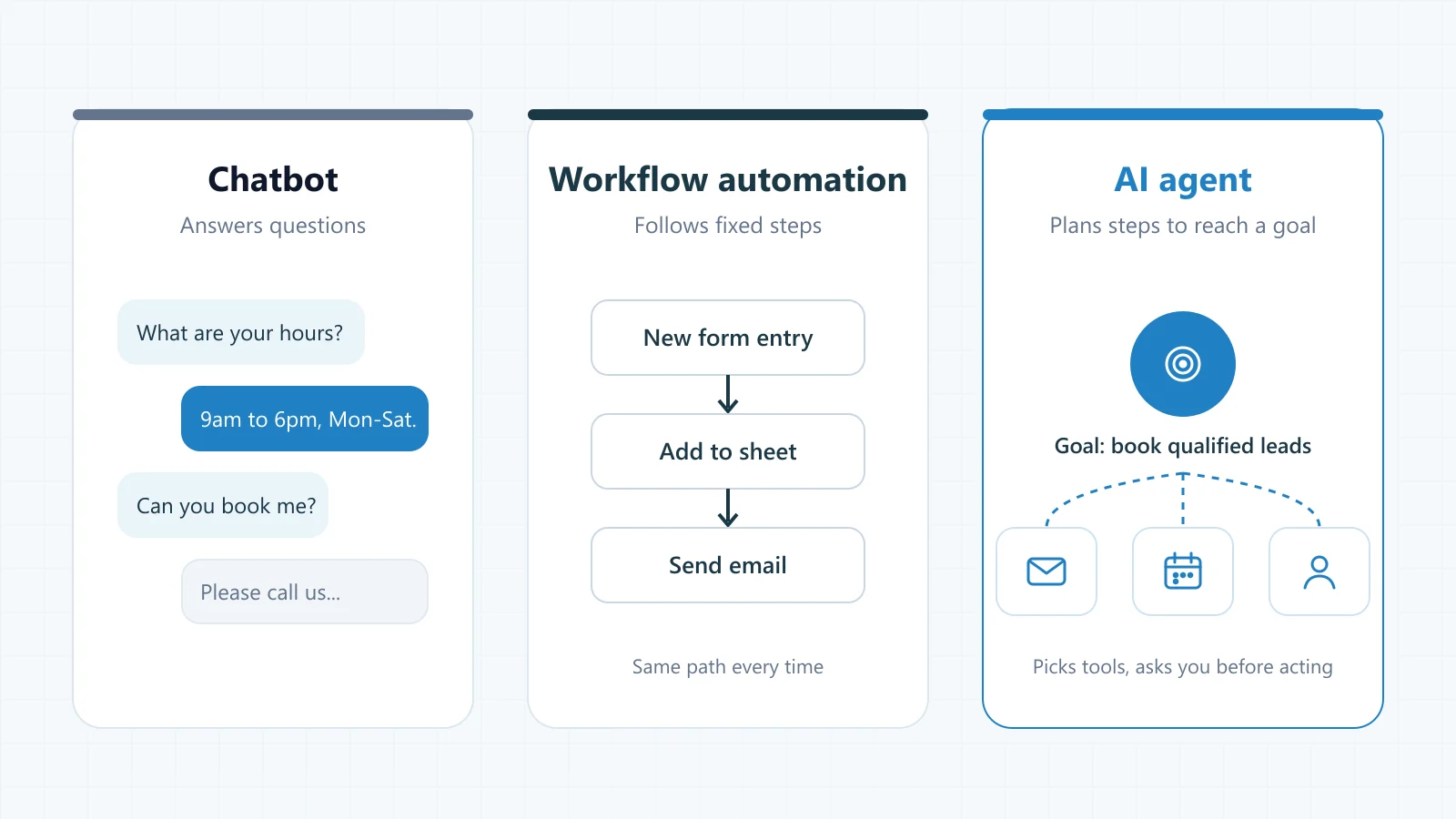
Chatbot
Answers questions in a chat window. It can tell a customer your opening hours, but it usually cannot book them in or update your records.
Workflow automation
Runs the same fixed steps every time, such as "new form entry, add to sheet, send email." Cheap and reliable, but it breaks when something unexpected happens.
AI agent
Works toward a goal and picks its own steps. It can read a messy email, decide it is a sales lead, check your calendar and draft a booking for you to approve.
Why AI agents are trending for small businesses in 2026
Two things changed this year. Agent features moved into tools owners already use, and no-code builders made setup much easier. Small teams can now try an agent without hiring a developer first.
- Adoption is real. The SBE Council reports that 58% of small employers use AI agents and another 14% are planning to. In its earlier 2026 technology survey, 82% of small employers said they had adopted AI tools.
- Big platforms are building agents in. The same report points to agent features aimed at small businesses, such as Meta's Muse, which can review ad results and draft the next campaign.
- Many projects still fail. Gartner predicts that over 40% of agentic AI projects will be cancelled by the end of 2027, mainly because of rising costs, unclear value and weak risk controls. It also warns about "agent washing," where ordinary tools are rebranded as agents.
So the trend is strong, but the winners will be the businesses that pick small, clear jobs and keep control.
7 practical AI agent examples for small businesses
The best uses share three things: the task repeats often, the rules are clear, and a mistake is easy to catch. These are the jobs where small teams usually see value first.
- Lead follow-up. Replies to website, WhatsApp or Instagram enquiries within minutes, asks a few qualifying questions and offers a call slot.
- Inbox sorting. Tags incoming email as sales, support, billing or spam, and drafts replies for you to send.
- Appointment booking. Checks your calendar, suggests times, books the meeting and sends a reminder.
- Customer support FAQs. Answers common questions from your own help content, then hands the chat to a person when it is unsure.
- Invoice and expense checks. Matches invoices to payments and flags unusual expenses for review.
- Weekly marketing reports. Pulls ad and social media results into a short summary with suggested next steps.
- Research and data clean-up. Finds duplicate contacts in your CRM, fills missing company details and summarises prospects before a call.
How does an AI agent work, step by step?
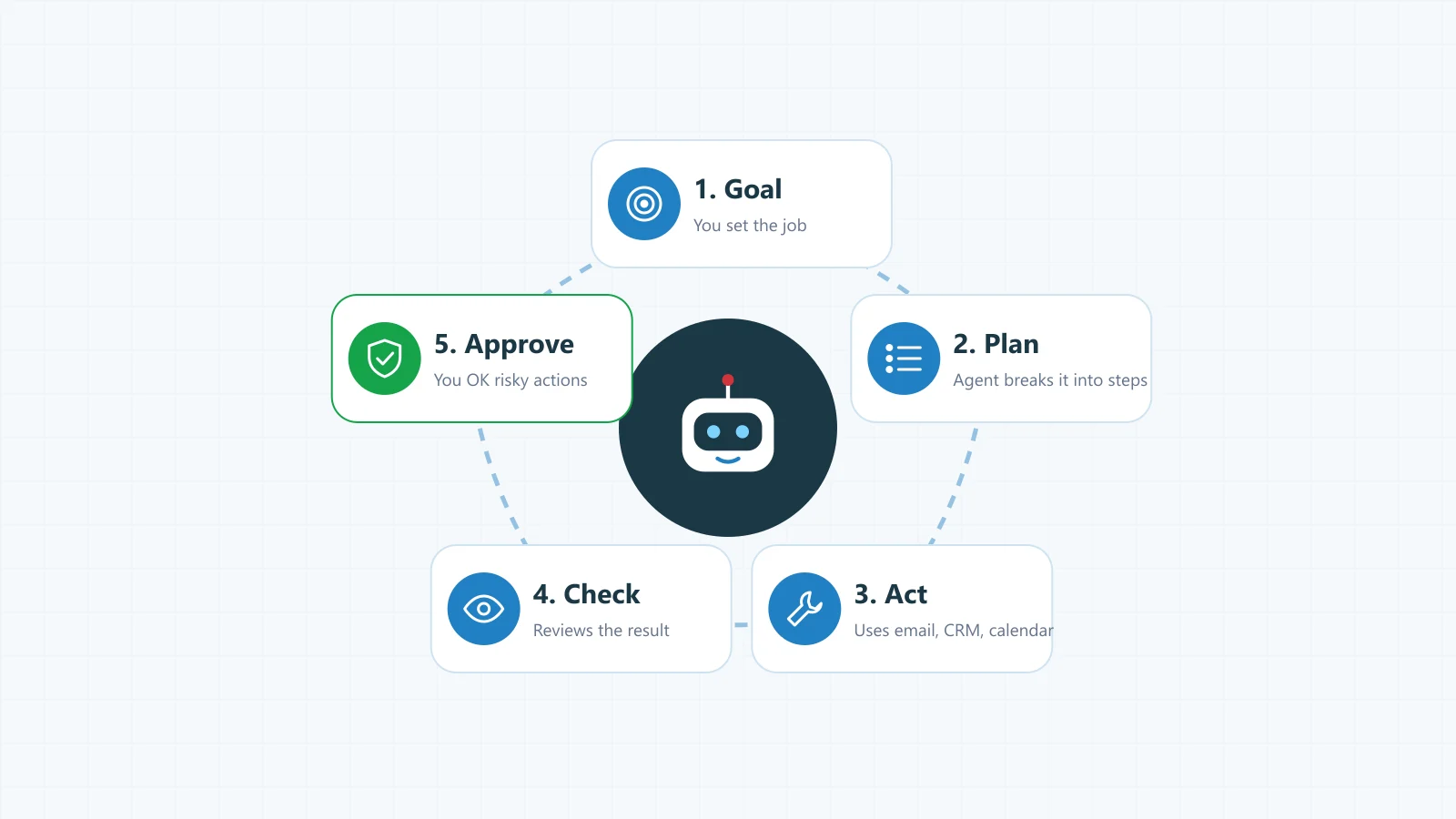
- Goal. You describe the job in plain words, with clear limits.
- Plan. The agent breaks the job into steps.
- Act. It uses connected tools, like your inbox, calendar or CRM.
- Check. It looks at the result and tries again if something failed.
- Approve. For anything that spends money, contacts a customer or deletes data, it waits for you.
How much does an AI agent cost in 2026?
Prices vary a lot, so treat these as rough ranges from public 2026 pricing guides, not quotes. What you pay depends on how many tasks the agent runs, which AI model it uses, and how many of your systems it must connect to.
Ready-made agent tool
Often about $50 to $200 a month per tool. Fastest to start. Best for common jobs like inbox sorting, meeting notes or support chat.
No-code agent builder
A monthly plan plus usage fees. You set up the steps yourself in tools such as Microsoft Copilot Studio. Good when your process is a little unusual.
Custom-built agent
Usually a one-time build in the thousands of dollars, plus a monthly AI usage bill. Best when the agent must work inside your own software or handle sensitive data.
Are AI agents safe for a small business?
They can be, if you set them up with care. Because agents act on their own, a mistake can travel further than a wrong chatbot answer. The OWASP Top 10 for LLM applications, a widely used security list, names the main risks.
- Prompt injection. A hidden instruction in an email or web page tricks the agent into doing something you did not ask for.
- Excessive agency. The agent has more access than it needs, so one wrong step can do real damage.
- Leaking sensitive data. Customer details end up in the wrong reply or the wrong tool.
- Confident mistakes. The agent gets a fact wrong and acts on it anyway.
- Runaway usage. The agent loops on a task and runs up a large bill.
Simple rules that keep an AI agent under control
- Give it the least access it needs. Read-only first, then add more.
- Require your approval before it pays, sends, publishes or deletes anything.
- Keep a log of every action so you can see what it did and why.
- Set a monthly spending cap with your AI provider.
- Test it on old or sample data before real customers see it.
- Make sure there is an easy way to switch it off.
Do you need an AI agent, or just a simple automation?
Often the honest answer is: start simpler. Anthropic's own advice is to use the simplest solution that works and add complexity only when it clearly helps. If your task follows the same steps every time, a normal workflow with one AI step is cheaper and more reliable.
An agent makes sense when the input is messy and the next step depends on what it finds. Ask yourself these questions:
- Does the task change a lot from one case to the next?
- Does it need to read unstructured text, like emails, chats or PDFs?
- Does it involve several tools that must work together?
- Is a mistake easy to spot and fix before it reaches a customer?
If you answered yes to most of these, an agent is worth a pilot. If not, a plain automation will probably serve you better.
How to start with AI agents: a 5-step plan
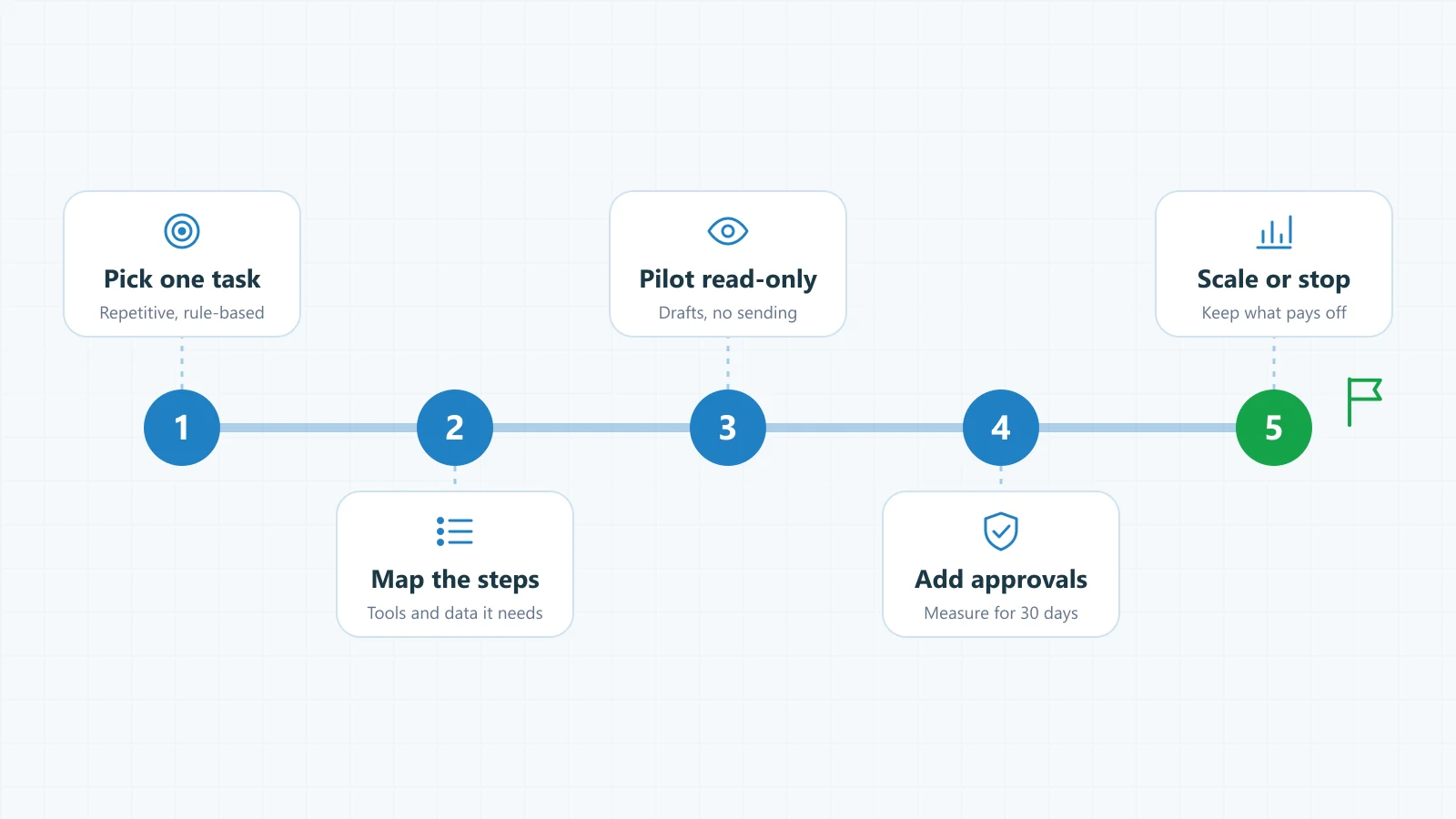
- Pick one task. Choose something repetitive that eats hours every week, like replying to new leads. Write down how long it takes today.
- Map the steps. List every step a person takes, the tools they open and the data they need. This becomes the agent's instructions.
- Run a read-only pilot. Let the agent draft replies or suggest actions, but not send or change anything. Compare its drafts with what your team would do.
- Add approvals and measure. Turn on actions one at a time, with your approval. Track time saved, response speed and errors for 30 days.
- Scale or stop. If the numbers are good, give it more volume or a second task. If not, switch it off. A cancelled pilot is cheaper than a failed rollout.
The bottom line
AI agents are useful when you treat them like a new team member: give them one clear job, limited access and a manager who checks their work. Skip the hype, start with a task you can measure, and let the results decide what comes next.
How AriseAbility can help
At AriseAbility, we build AI agents, chatbots and workflow automation for businesses around the world from our base in Multan, Pakistan. Our own Shadow AI companion uses a multi-agent setup where agents hand work to each other, so we know where these systems shine and where they need guard rails.
New to us? Read what AriseAbility does or browse our project portfolio. If you would rather learn to build with AI yourself, start with our free Python and AI courses on YouTube.
Frequently asked questions
What is an AI agent in simple words?
An AI agent is a program that is given a goal and figures out the steps to reach it. It uses tools like email, calendars and spreadsheets to act, and checks its own results. Unlike a chatbot, it does the work, not just the talking.
What is the difference between an AI agent and a chatbot?
A chatbot answers questions inside a chat window. An AI agent can take actions across your tools, such as booking a meeting, updating a CRM record or drafting an invoice reminder. Many agents include a chat window, but the ability to act is what makes them agents.
How much does an AI agent cost for a small business?
Ready-made agent tools often cost about $50 to $200 a month each. Custom-built agents usually need a one-time build in the thousands of dollars, plus a monthly bill for AI usage. Your real cost depends on task volume, the AI model used and how many systems the agent connects to.
Can AI agents replace employees?
Not in most small businesses. Agents are best at repetitive tasks like sorting email or following up on leads, which frees people for sales, service and decisions. They still need a person to set goals, approve risky actions and check quality.
Are AI agents safe to use with customer data?
They can be, with the right setup. Give the agent the least access it needs, keep a human approval step for sending, paying or deleting, log its actions and check your provider's data policy. The OWASP Top 10 for LLM applications is a good checklist of risks to cover.
Do I need coding skills to use an AI agent?
No, not to get started. Many ready-made tools and no-code builders, such as Microsoft Copilot Studio, let you set up an agent with plain instructions. You will need a developer when the agent must connect to your own software, handle sensitive data or follow complex business rules.
What is the best first AI agent for a small business?
Lead follow-up is often the best first agent, because speed matters and results are easy to measure. Inbox sorting and appointment booking are also good starters. Pick whichever task takes your team the most time each week.
Can businesses in Pakistan use AI agents?
Yes. The same tools work in Pakistan, and leading AI models understand Urdu and Roman Urdu, which helps with WhatsApp and Instagram customers. Test the agent's replies with real customer messages before going live, and check how each tool bills in your currency.
How long does it take to set up an AI agent?
A ready-made tool can be running in a day. A custom agent depends on how many systems it connects to and how many approval steps it needs. A focused pilot on one task is the fastest route, because you learn what works before you build more.